
Machine Learning Foundations 1: Vectors, Matrices, and Linear Regression
Build linear regression from first principles: vectors, projections, least squares, residual checks, and runnable Python with original mathematical visualizations.
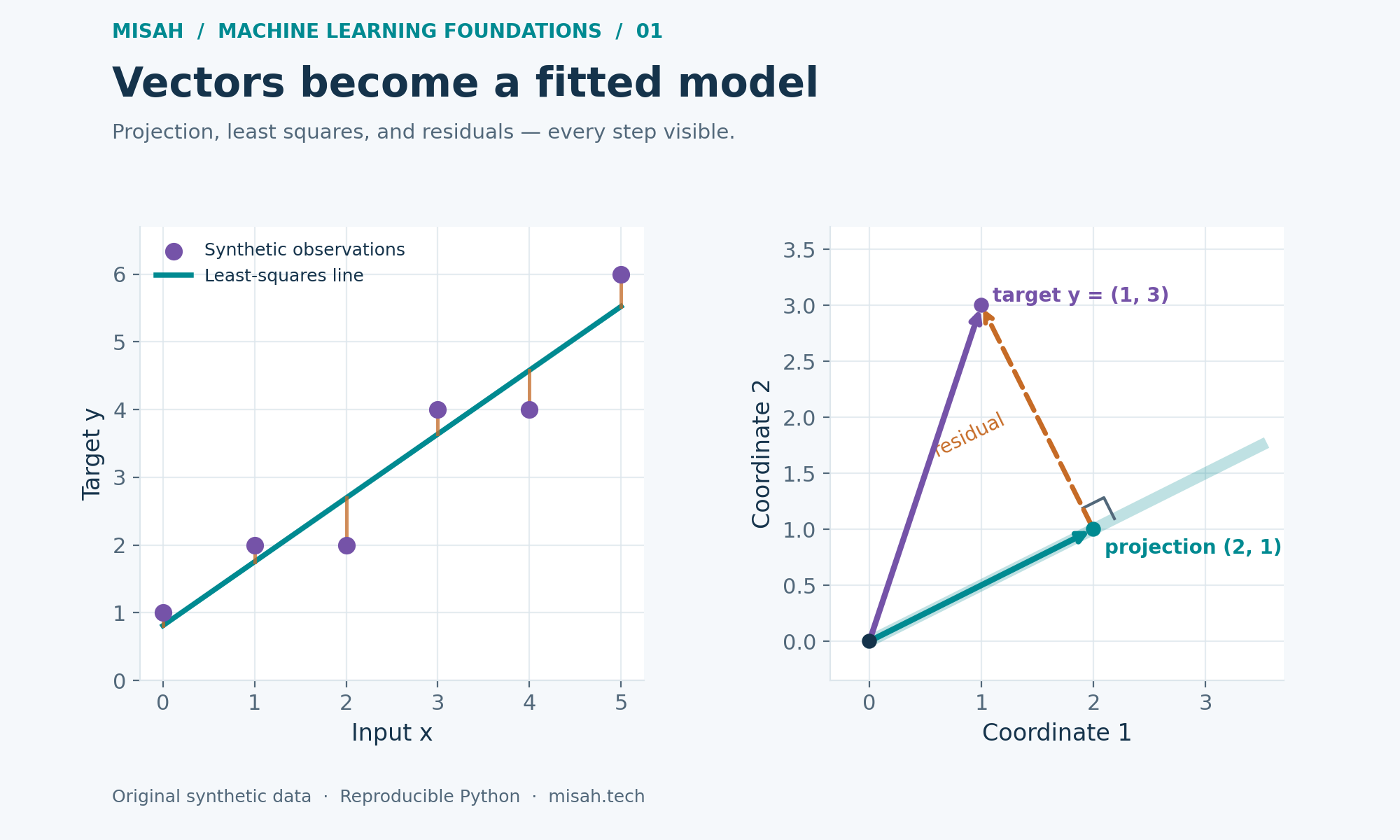
A model can look mysterious when a library hides every calculation. This first part of our Machine Learning Foundations series starts with a smaller question: how does a list of measurements become a fitted prediction? We will build vectors, use dot products to measure alignment, and fit a straight line with ordinary Python. The same operations appear inside much larger learning systems.
You need only basic algebra and a willingness to inspect a few numbers. Every observation and diagram in this lesson is synthetic and original. Each Run Python cell includes its own setup, so you can run the cells in either order. The plotted output is computed from the cell rather than being a screenshot of a different experiment.
1. Treat an example as a vector
A vector is an ordered collection of coordinates. An example with temperature and humidity has two coordinates; a grayscale image may have thousands. Order matters: swapping columns silently changes the meaning of a learned coefficient. A feature vector describes one observation, while a target is the value we want to predict for that observation.
The dot product multiplies matching coordinates and adds the results. It is both a computation and a geometric tool. For nonzero vectors, its sign distinguishes broadly aligned from opposing directions; a zero dot product means perpendicular directions in ordinary Euclidean geometry. Its magnitude also depends on vector lengths, so a large value alone is not a normalized similarity measure.
2. Find the closest point on a direction
Imagine that our predictions are restricted to multiples of a direction a. The target y may lie off that line. We seek the multiplier that makes the squared distance between the target and its prediction as small as possible. The remaining difference is the residual. At the closest point, that residual is perpendicular to the permitted direction.
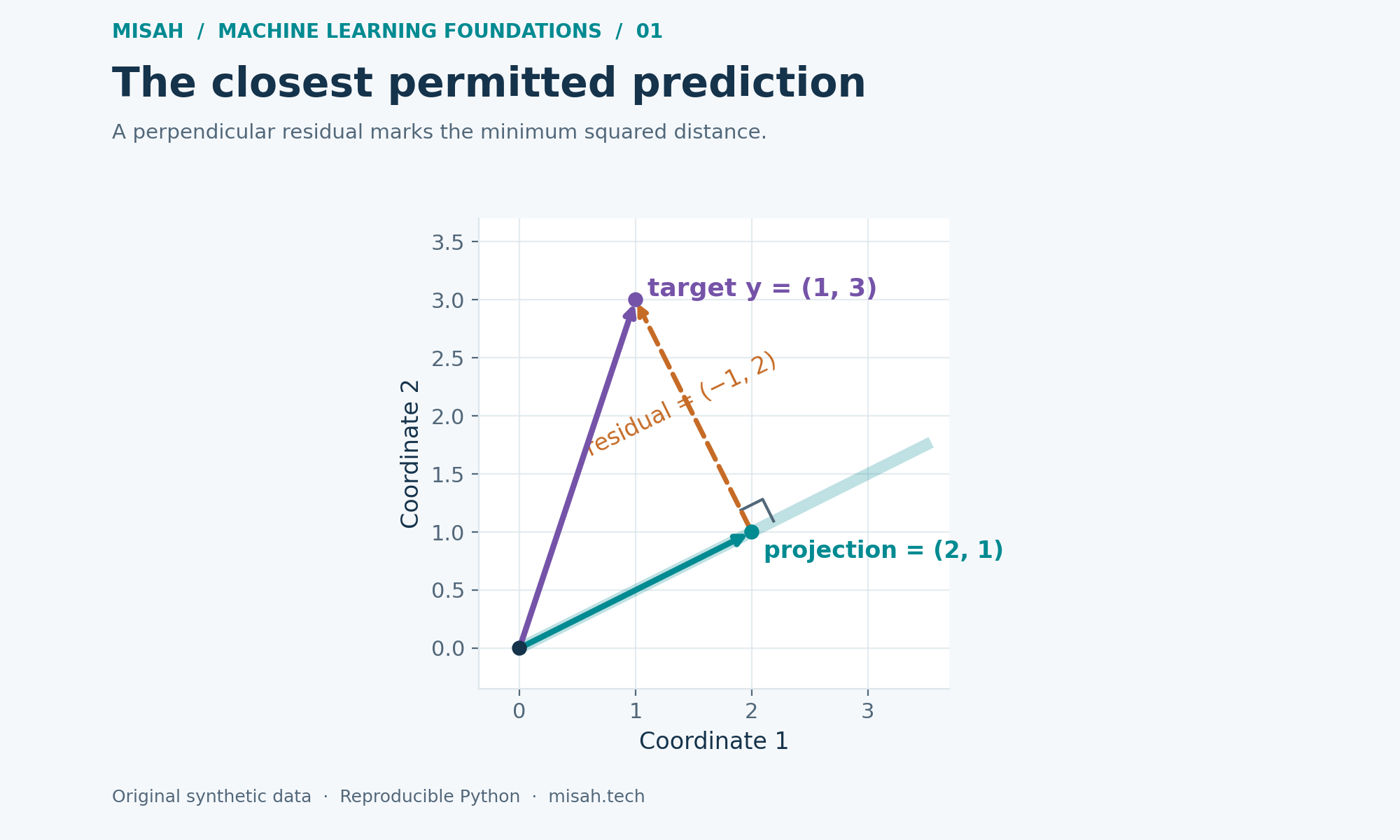
Run this cell, then change the target coordinates. The coefficient is 1.000 for the original numbers. The residual is (−1, 2), whose dot product with (2, 1) is zero. This is an exact geometric check for our chosen inputs, rather than evidence that a predictive model generalizes to new observations. The interactive chart scales its axes independently, so perpendicular vectors may not appear at right angles. Check orthogonality using the printed direction–residual dot product.
from math import isclose

# A two-dimensional geometric example, created for this lesson.
a = [2.0, 1.0]
y = [1.0, 3.0]
dot = lambda u, v: sum(x * z for x, z in zip(u, v))
coefficient = dot(a, y) / dot(a, a)
projection = [coefficient * value for value in a]
residual = [target - fitted for target, fitted in zip(y, projection)]
orthogonality = dot(a, residual)

print(f"projection coefficient = {coefficient:.3f}")
print(f"projected vector = {projection}; residual = {residual}")
print(f"direction dot residual = {orthogonality:.12f}")
assert isclose(orthogonality, 0.0, abs_tol=1e-12)

if 'plot' in globals():
    plot({
        'title': 'Project a target onto one direction',
        'xLabel': 'Coordinate 1', 'yLabel': 'Coordinate 2',
        'series': [
            {'name': 'Target y', 'kind': 'line', 'points': [[0, 0], y]},
            {'name': 'Projection onto a', 'kind': 'line', 'points': [[0, 0], projection]},
            {'name': 'Residual', 'kind': 'line', 'points': [projection, y]},
        ],
    })
Python · Standard library
Your changes stay in this browser tab. Reset restores the published example.
Runs locally in an isolated browser worker. Python loads on first run.
3. Put observations into a design matrix
For regression, stack one observation per row. To fit an intercept and a slope, each row contains a constant one followed by the input value. Multiplying this design matrix by the parameter vector produces every prediction at once. The first column lets the fitted line shift up or down; without it, the line would be forced through the origin.
We use six invented observations with inputs zero through five and targets 1, 2, 2, 4, 4, and 6. A line cannot hit all six targets exactly. Least squares chooses the line with the smallest sum of squared vertical residuals. Squaring prevents positive and negative errors from canceling and makes large deviations count disproportionately.
4. Solve the small case without hiding the algebra
Setting the gradient to zero gives the normal equations. Their geometry is the same as the earlier projection: the residual must be orthogonal to every column of the design matrix. With an intercept column, residuals sum to zero. With an input column, the dot product of input values and residuals is also zero.
For a single input, centering the observations gives a compact equivalent formula. Subtract the input and target means, measure how they vary together, and divide by input variation. Recover the intercept from the means. The denominator must be positive: if every input is identical, the data cannot identify a separate slope and intercept.
from math import isclose

# Six explicitly synthetic observations; no downloaded dataset.
xs = [0.0, 1.0, 2.0, 3.0, 4.0, 5.0]
ys = [1.0, 2.0, 2.0, 4.0, 4.0, 6.0]
n = len(xs)
x_mean, y_mean = sum(xs) / n, sum(ys) / n
xx = sum((x - x_mean) ** 2 for x in xs)
if xx <= 0:
    raise ValueError('A slope needs at least two distinct x values.')
w = sum((x - x_mean) * (y - y_mean)
        for x, y in zip(xs, ys)) / xx
b = y_mean - w * x_mean
fitted = [b + w * x for x in xs]
residuals = [y - prediction for y, prediction in zip(ys, fitted)]
mse = sum(r * r for r in residuals) / n

print(f"intercept = {b:.6f}; slope = {w:.6f}")
print(f"training MSE = {mse:.6f}")
print(f"sum residuals = {sum(residuals):.12f}")
print(f"x dot residuals = {sum(x*r for x,r in zip(xs,residuals)):.12f}")
assert isclose(sum(residuals), 0.0, abs_tol=1e-10)
assert isclose(sum(x*r for x,r in zip(xs,residuals)), 0.0, abs_tol=1e-10)

if 'plot' in globals():
    grid = [i / 10 for i in range(51)]
    plot({
        'title': 'Fit a line to six synthetic observations',
        'xLabel': 'Input x', 'yLabel': 'Target y',
        'series': [
            {'name': 'Synthetic observations', 'kind': 'scatter',
             'points': [[x, y] for x, y in zip(xs, ys)]},
            {'name': 'Least-squares fit', 'kind': 'line',
             'points': [[x, b + w*x] for x in grid]},
        ],
    })
    plot({
        'title': 'Inspect what the fitted line leaves unexplained',
        'xLabel': 'Input x', 'yLabel': 'Residual y - prediction',
        'series': [
            {'name': 'Residuals', 'kind': 'scatter',
             'points': [[x, r] for x, r in zip(xs, residuals)]},
            {'name': 'Zero residual', 'kind': 'line', 'points': [[0, 0], [5, 0]]},
        ],
    })
Python · Standard library
Your changes stay in this browser tab. Reset restores the published example.
Runs locally in an isolated browser worker. Python loads on first run.
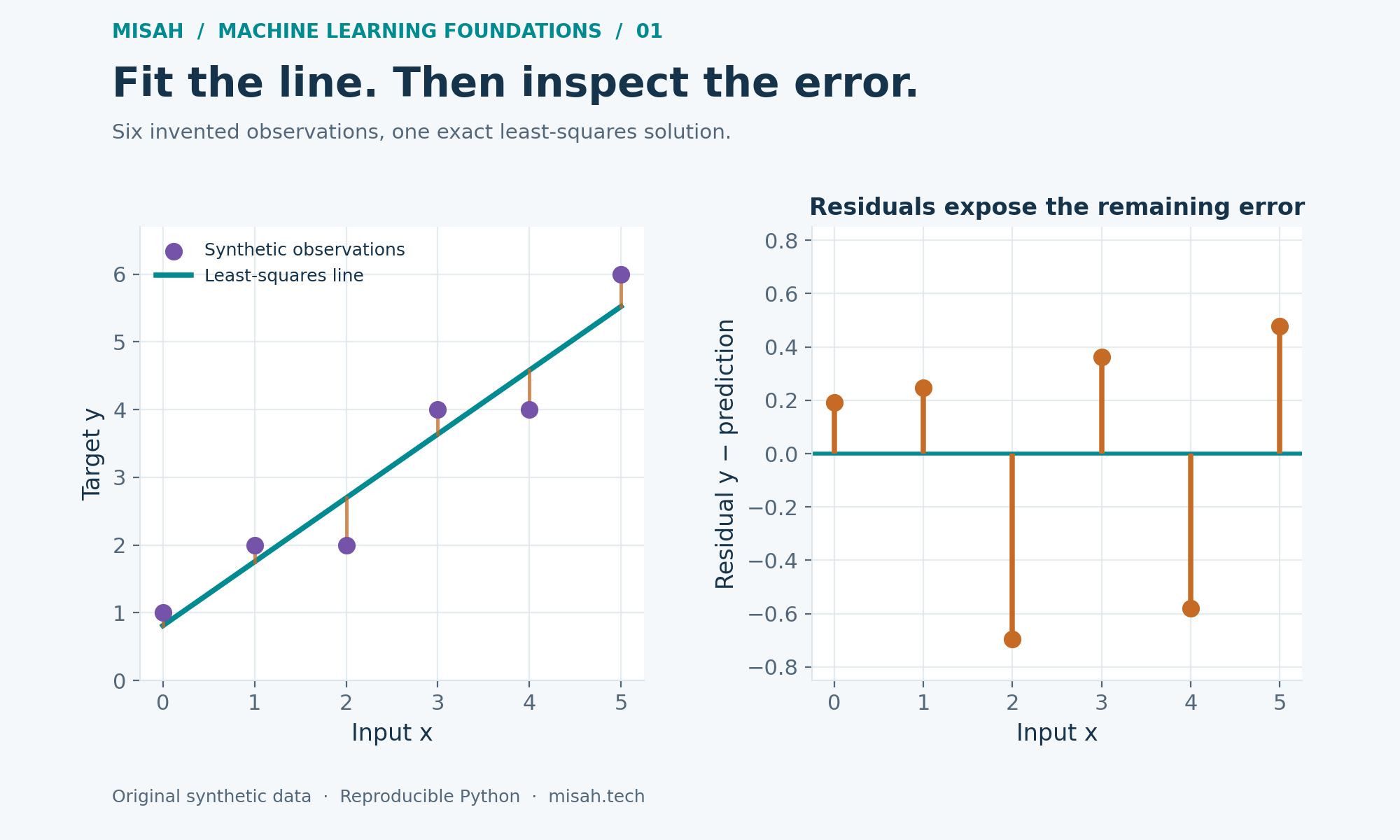
With the original data unchanged, the slope is 0.942857, the intercept is 0.809524, and training MSE is 0.212698. At input zero, the model predicts the intercept; increasing the input by one raises the prediction by the slope. A residual of −0.7 would mean that the observed target lies 0.7 units below its fitted value. These interpretations depend on the sign convention used in the code.
The cell reports the fitted intercept, slope, training mean squared error, and two orthogonality checks. Values printed as minus zero are harmless floating-point rounding. The fit is descriptive for these six points. We deliberately have no held-out estimate here; the next part introduces a separate validation split and compares against a simple baseline.
5. Keep the formula, improve the numerical method
The normal equations explain the optimum, but explicitly calculating a matrix inverse is a poor general implementation strategy. Duplicate or nearly duplicate features can make coefficients non-unique or unstable. Forming X transpose X also squares the two-norm condition number when X has full column rank, making numerical difficulties worse. The tiny centered calculation above is an instructional special case.
For general data, use a tested least-squares solver based on QR or singular-value decomposition, inspect rank, and consider whether redundant features should be removed. A solver may return a useful prediction even when individual coefficients are not identifiable. Coefficient size is also tied to units: changing meters to centimeters changes the corresponding slope without changing the underlying relationship.
A useful implementation habit is to check quantities that should follow from the mathematics. Here we checked orthogonality rather than merely checking that the program ran. Those checks would catch some sign or indexing mistakes, but they would not detect mislabeled observations, a missing predictor, or a poor choice of model family. Mathematical consistency and practical suitability answer different questions.
Try it yourself
Move the last target from 6 to 12. Observe how a single large residual changes the fitted slope, then explain why squared error amplifies its influence.
Add ten to every target. The intercept should rise by ten while the slope stays the same. Verify both orthogonality checks still hold.
Make every input equal. Explain the ValueError in terms of the design matrix columns rather than merely removing the check.
Ask whether a straight line is appropriate before treating residuals as random noise. A curved residual pattern suggests that the chosen model misses structure.
Sources and reproducibility
The projection interpretation and normal equations are developed in Georgia Tech’s Interactive Linear Algebra, Section 6.5. Our coordinates, data, code, and diagrams are original worked examples.
For a practical solver that reports residuals, rank, and singular values, see NumPy’s numpy.linalg.lstsq documentation. The runnable cells here intentionally use only Python’s standard library.
The numerical caveat about squaring the condition number is derived in Andrew J. Wathen’s “Least Squares and the Not-Normal Equations”. It concerns the solution method, separately from whether a line adequately represents the observations.
Continue the foundations series
You are reading this part: Part 1: Vectors, matrices, and linear regression