
Why indexes work: from search algorithms to query plans
Software Engineering 2/2: count linear and binary search probes, test edge cases, and visualize selectivity before connecting the model to database indexes.
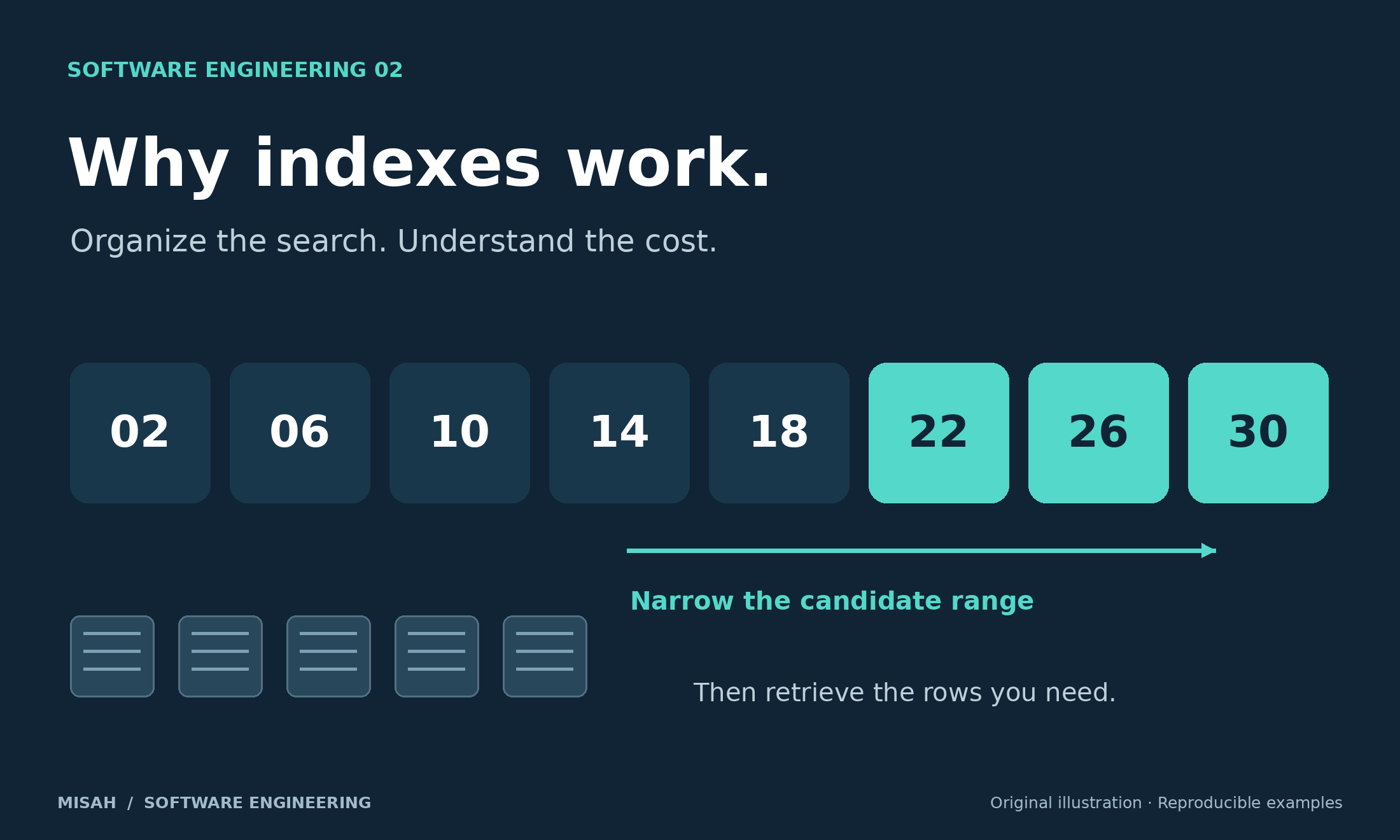
Software Engineering, part 2 of 2. A page loads quickly with a hundred records, then slows after the table grows. Adding an index may help, but "indexes are faster" is too vague to guide a design. An index spends storage and write work to organize another path to data. Its value depends on the question being asked and how much data the answer needs.
We will begin with a sorted array that fits in memory. Counting inspected keys makes the search algorithm visible without pretending that a short browser timing measures database performance. We will then move to database pages, matching-row counts, and query plans. Keep these layers separate: an elegant algorithmic bound is a useful explanation, but it is not a latency promise.
1. Count work before measuring time
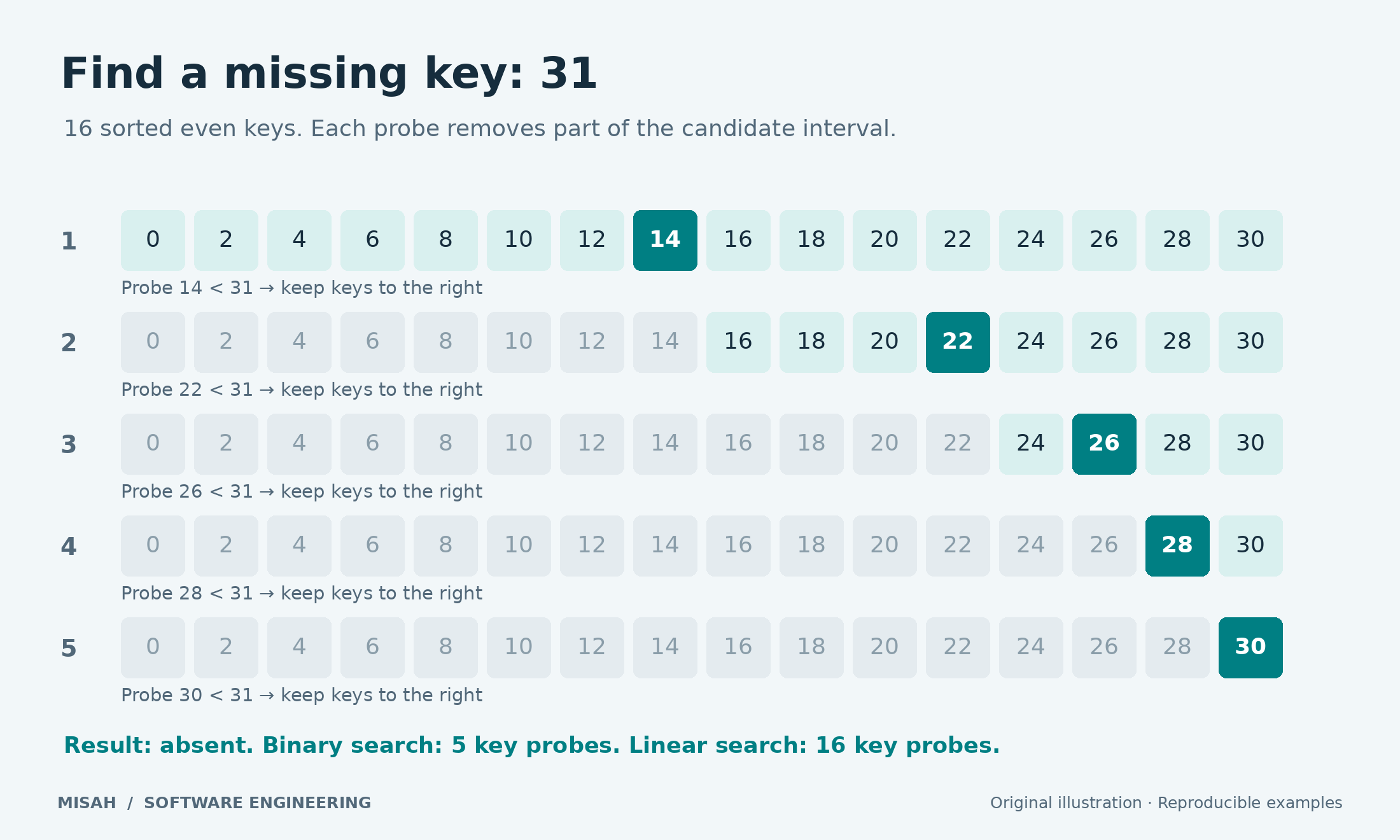
Linear search visits keys in order until it finds the target or reaches the end. In a sorted array, binary search compares the middle key and discards the half that cannot contain the target. Its essential precondition is a consistent sorted order. Applying the same function to an unsorted array can produce a wrong answer quickly, which is not an optimization.
In this cell, one probe means inspecting one array element. A loop can perform several JavaScript comparisons per probe; we deliberately do not count them separately. Each target is missing and larger than every stored key. This forces the linear search to inspect all keys and follows the rightmost binary-search path. Build time and memory allocation are outside the counted operation.
function linearSearch(values, target) {
  let probes = 0;
  for (let i = 0; i < values.length; i++) {
    probes++;
    if (values[i] === target) return { index: i, probes };
  }
  return { index: -1, probes };
}
function binarySearch(values, target) {
  let low = 0, high = values.length - 1, probes = 0;
  while (low <= high) {
    const middle = low + Math.floor((high - low) / 2);
    const value = values[middle];
    probes++;
    if (value === target) return { index: middle, probes };
    if (value < target) low = middle + 1; else high = middle - 1;
  }
  return { index: -1, probes };
}
const sizes = [16, 32, 64, 128, 256, 512, 1024];
const linear = [], binary = [];
for (const n of sizes) {
  const sorted = Array.from({ length: n }, (_, i) => 2 * i);
  const absent = 2 * n - 1; // larger than every stored even number
  const a = linearSearch(sorted, absent), b = binarySearch(sorted, absent);
  if (a.index !== -1 || b.index !== -1) throw new Error('Missing key found');
  linear.push([n, a.probes]); binary.push([n, b.probes]);
}
console.log({ n: 1024, linearProbes: linear.at(-1)[1], binaryProbes: binary.at(-1)[1] });
if (typeof plot === 'function') plot({
  title: 'Missing-key lookup in sorted arrays',
  xLabel: 'Number of keys', yLabel: 'Key probes (not milliseconds)',
  series: [
    { name: 'Linear search', kind: 'line', points: linear },
    { name: 'Binary search', kind: 'line', points: binary }
  ]
});Browser JavaScript
Your changes stay in this browser tab. Reset restores the published example.
Runs locally in an isolated browser worker. Use console.log() or return a result.
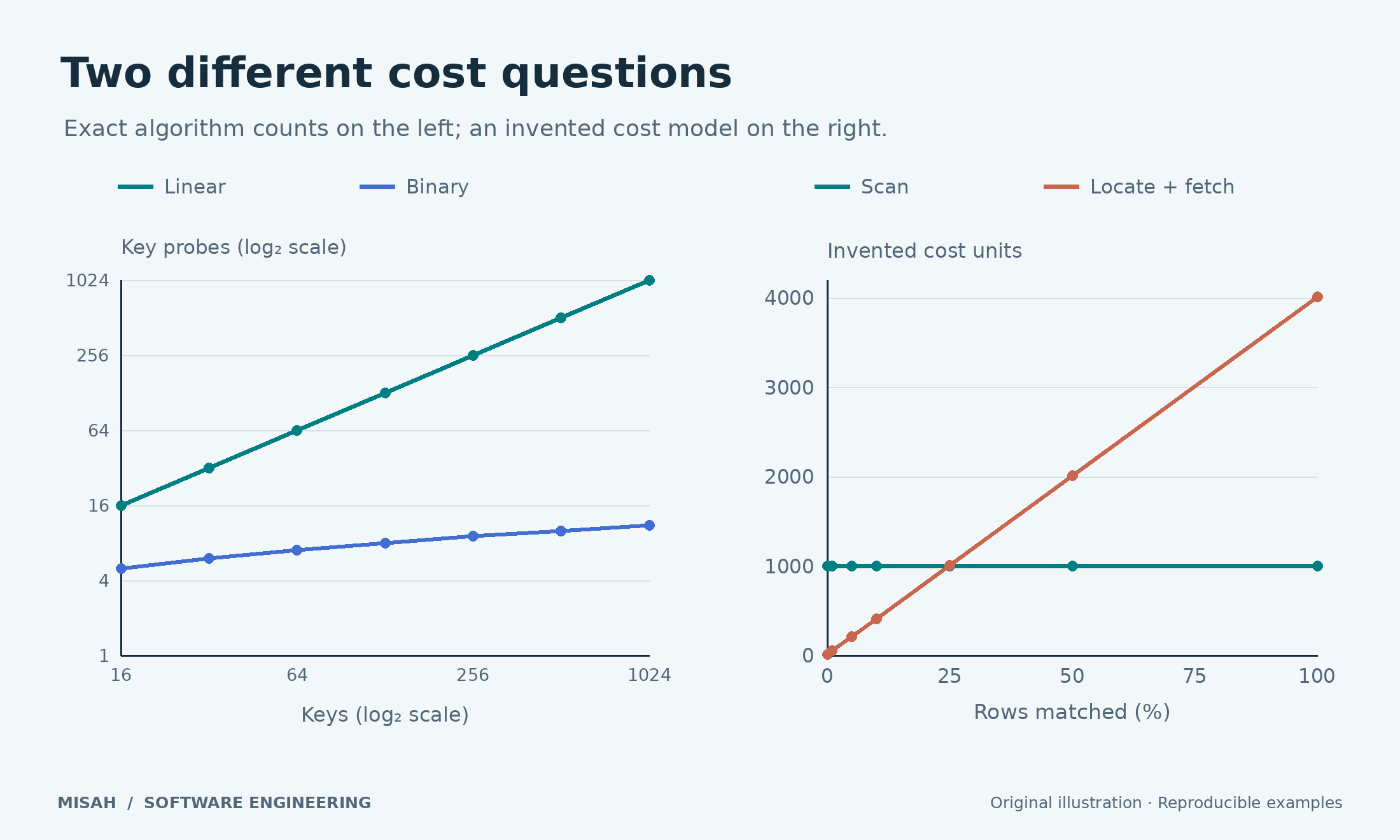
With 1,024 keys, the cell reports 1,024 probes for linear search and 11 for binary search. Doubling this particular array adds only one probe to that binary-search path. A successful search can stop earlier, and another missing target can follow a different path. The chart compares these exact inputs, rather than an average across an unstated workload.
2. Verify the answer before trusting the curve
The loop invariant explains correctness: if the target exists, it lies within the inclusive interval from low to high. A middle value smaller than the target lets us advance low beyond that position. A larger value lets us decrease high. Each failed comparison removes the middle position, so the interval shrinks and eventually becomes empty for a missing target.
Off-by-one errors usually appear at the boundaries: an empty array, the first or last element, a target between two keys, or a target outside the full range. The next independent cell checks every integer target around unique even-key arrays of sizes zero through 64. It compares the result with a simple reference search. Duplicate keys need a different promise: this algorithm returns any matching position, not necessarily the first.
function binarySearch(values, target) {
  let low = 0, high = values.length - 1;
  while (low <= high) {
    const middle = low + Math.floor((high - low) / 2);
    if (values[middle] === target) return middle;
    if (values[middle] < target) low = middle + 1; else high = middle - 1;
  }
  return -1;
}
let checked = 0;
for (let n = 0; n <= 64; n++) {
  const sorted = Array.from({ length: n }, (_, i) => 2 * i);
  for (let target = -1; target <= 2 * n + 1; target++) {
    const actual = binarySearch(sorted, target);
    const expected = sorted.findIndex(value => value === target);
    if (actual !== expected) throw new Error(`Mismatch: n=${n}, target=${target}`);
    checked++;
  }
}
const duplicates = [2, 2, 2];
const index = binarySearch(duplicates, 2);
if (index < 0 || duplicates[index] !== 2) throw new Error('Duplicate lookup failed');
console.log({ uniqueKeyCasesChecked: checked, duplicateValueFound: duplicates[index] });Browser JavaScript
Your changes stay in this browser tab. Reset restores the published example.
Runs locally in an isolated browser worker. Use console.log() or return a result.
The output is 4,355 unique-key cases checked, plus a separate duplicate-value check. Those tests do not prove every possible JavaScript input correct. The contract still requires a sorted numeric array without invalid values. For first occurrence, insertion position, or an inclusive range query, define the required boundary behavior explicitly and test a lower-bound or upper-bound algorithm instead of quietly changing the meaning of this result.
3. A database index is not this JavaScript array
Actual database structures work in pages and carry additional metadata. PostgreSQL documents B-tree indexes as supporting ordered equality and range comparisons. A B-tree has many children per page, rather than the two branches in our teaching example. Page reads, cache state, tuple visibility, and fetching the requested columns contribute costs that our probe counter deliberately omits.
The useful connection is organized lookup followed by retrieval. SQLite’s query-planning explanation walks through searches, matching rows, and covering indexes. Read it as an explanation of that engine’s execution strategies, rather than a guarantee that a browser array and a database have identical physical behavior.
Sorting a new array is also work. A one-off lookup in unsorted data may be better served by a simple scan than by building an ordered structure first. Repeated lookups can amortize that setup cost. Databases maintain indexes as data changes, so the tradeoff includes insert, update, and delete work as well as storage. Choose indexes for important query patterns, rather than for every column that happens to exist.
4. Selectivity changes the answer
Suppose a query needs one row out of a thousand. Finding that small set through an index may avoid a great deal of scanning. A query matching nearly every row still has to return nearly every row, and separate row fetches can erase the lookup advantage. We will model that relationship with invented costs: a scan costs 1,000 units, locating the range costs 10, and each matching row costs four more units.
// Deliberately invented cost units: this is a model, not a database benchmark.
const rows = 1000;
const locateCost = 10;
const fetchCost = 4;
const matches = [1, 10, 50, 100, 250, 500, 1000];
const scan = matches.map(k => [100 * k / rows, rows]);
const indexed = matches.map(k => [100 * k / rows, locateCost + fetchCost * k]);
console.log({
  breakEvenMatchedRows: (rows - locateCost) / fetchCost,
  at250Matches: { scan: rows, indexed: locateCost + fetchCost * 250 }
});
if (typeof plot === 'function') plot({
  title: 'Selectivity under an illustrative cost model',
  xLabel: 'Rows matched (%)', yLabel: 'Invented cost units',
  series: [
    { name: 'Full scan', kind: 'line', points: scan },
    { name: 'Locate + row fetches', kind: 'line', points: indexed }
  ]
});Browser JavaScript
Your changes stay in this browser tab. Reset restores the published example.
Runs locally in an isolated browser worker. Use console.log() or return a result.
This model crosses at 247.5 matched rows. At 250 matches it assigns 1,010 units to indexed access and 1,000 to a scan. The crossover is a consequence of our chosen constants, not a universal 25-percent rule. Change fetchCost from four to one and explain why the crossover moves. Real planners estimate several possible plans using statistics and engine-specific cost assumptions.
5. Design and inspect an actual query
For an activity list, start with the question: one customer, a date range, newest entries first, and a small page of selected columns. An index ordered by customer_id and created_at is a candidate worth evaluating for that pattern. It is not automatically the best index for a global report grouped by event type. Ordering, predicate shape, data distribution, and projected columns all affect the useful access path.
Column order matters, and optimizer behavior has nuances. PostgreSQL’s multicolumn-index documentation explains leading equality conditions, range conditions, and skip-scan cases. Avoid turning the common leading-column guideline into an absolute claim that every query missing the first column can never use the index.
Inspect the candidate with EXPLAIN and EXPLAIN ANALYZE. Compare estimated and actual row counts, scan choices, buffer activity, and the work below LIMIT. ANALYZE executes the statement, so use a controlled environment and understand its effects. Collect representative data and parameters; a plan observed on ten convenient rows may tell you little about a busy application.
Returning fewer columns can also change the available plan. PostgreSQL’s index-only-scan documentation explains both stored-column requirements and row-visibility checks. A covering index does not guarantee zero table access. Extra included data also makes the index larger, so evaluate the read benefit alongside write and maintenance costs.
Practice and connect the lessons
Extend the first cell to search for the first, middle, and last stored key. Then add a missing-key workload with targets between keys and describe exactly what you count. For a database exercise, write down one real screen’s filter, ordering, and projected columns before proposing an index. Compare a selective query and a broad report, then record the observed plans rather than predicting a speedup percentage.
Revisit part 1 — Contracts, validation, and tests for the same discipline at an API boundary: define valid inputs, state the result contract, and test the assumptions. Search and indexing become easier to reason about when the workload is as explicit as the code.
Sources and further reading
SQLite: Query Planning — lookup, matching rows, and covering-index illustrations.
PostgreSQL: Index Types — B-tree capabilities and alternative index methods.
PostgreSQL: Multicolumn Indexes — ordered columns and planner considerations.
PostgreSQL: Using EXPLAIN — reading estimates and measured execution plans.
PostgreSQL: Index-Only Scans and Covering Indexes — projected data, visibility, and index size tradeoffs.