
From pixels to predictions: the mathematics of logistic regression
An inspectable machine-learning experiment with original image analysis, sigmoid and gradient equations, and a complete Python classifier you can run in your browser.
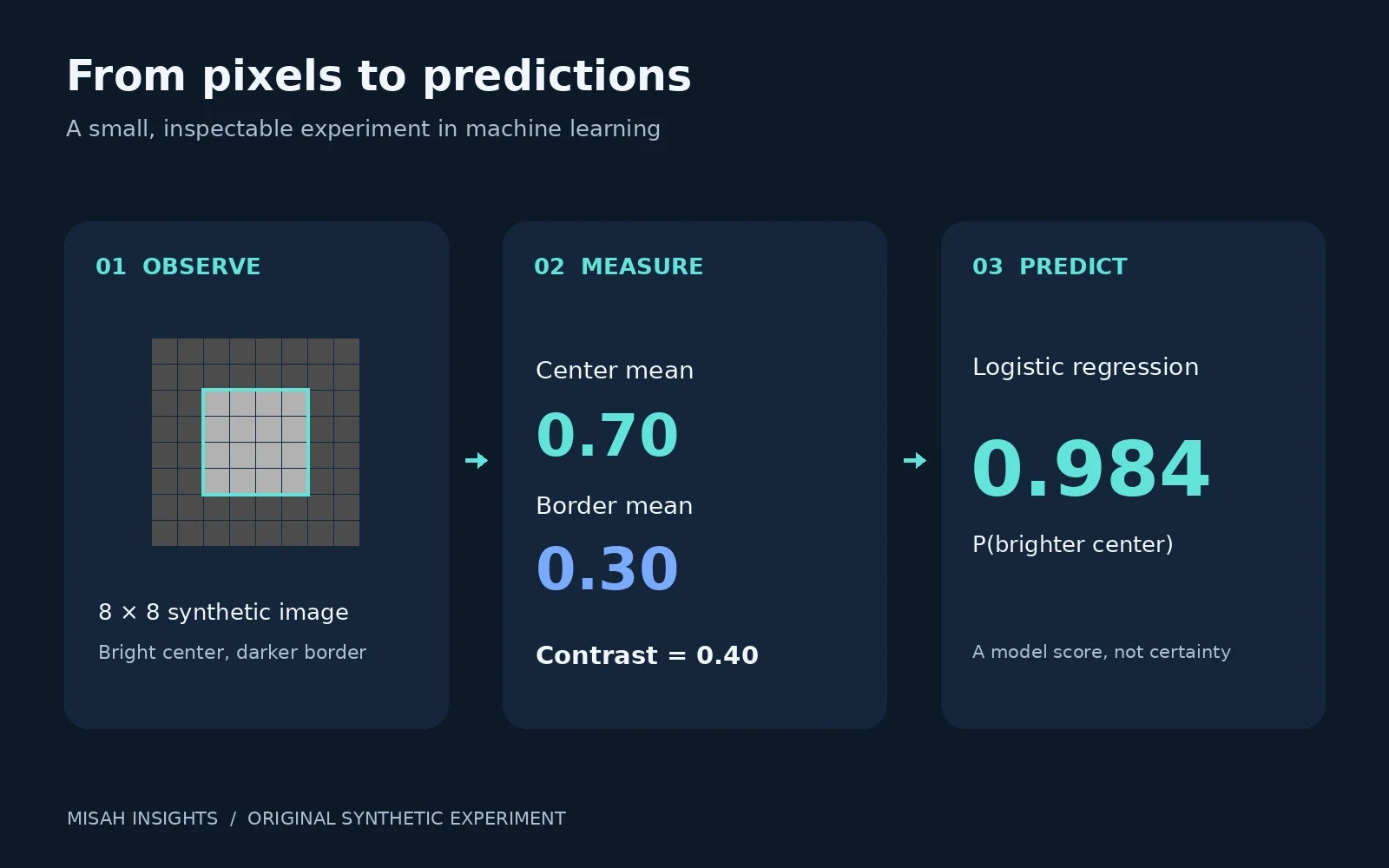
A useful way to understand machine learning is to make every step small enough to inspect. In this walkthrough, we turn an 8 × 8 image into one number, turn that number into a probability, and train the rule with ordinary Python. The complete experiment runs below in your browser. Its purpose is to explain the mathematics, not to claim performance on real photographs.
The question is deliberately narrow: is the center of this synthetic image brighter than its surrounding border? We generate the pixels ourselves, so the labels, measurements, plots, and expected outputs are all reproducible. This is an educational experiment from Misah Technologies; it is not a client case study or a production vision system.
1. Build an image we can measure
Each image contains 64 grayscale intensities between zero and one. A centered 4 × 4 square contains 16 pixels; the other 48 form the surrounding region. For a positive contrast of 0.40, we set the central pixels to 0.70 and the border pixels to 0.30. Negative contrast reverses the relationship. There is no hidden image-processing library or pre-trained network.
Rather than feed all 64 pixels to the classifier, we explicitly design a contrast feature. Let denote the central pixels and the outer pixels. The difference between their means is:
Dividing by 0.5 is a fixed feature scale chosen for this demonstration. It is separate from normalizing raw camera bytes by 255. For real datasets, any learned mean or scale should be estimated on the training split and reused unchanged for validation and inference. Otherwise, preprocessing can leak information across the evaluation boundary.
2. Turn contrast into a probability
Logistic regression combines a weight and a bias into a score, then applies the sigmoid function. Here the predicted event is “brighter center,” encoded as . The opposite label is .
A positive weight makes larger contrast produce a larger score. The sigmoid maps that score into the interval between zero and one. At zero score it returns one half. A threshold of 0.5 is convenient for this balanced toy problem; changing a threshold changes decisions, not the underlying fitted probabilities. A score of 0.98 alone does not establish that a model is well calibrated in the real world.
3. Give the model an objective
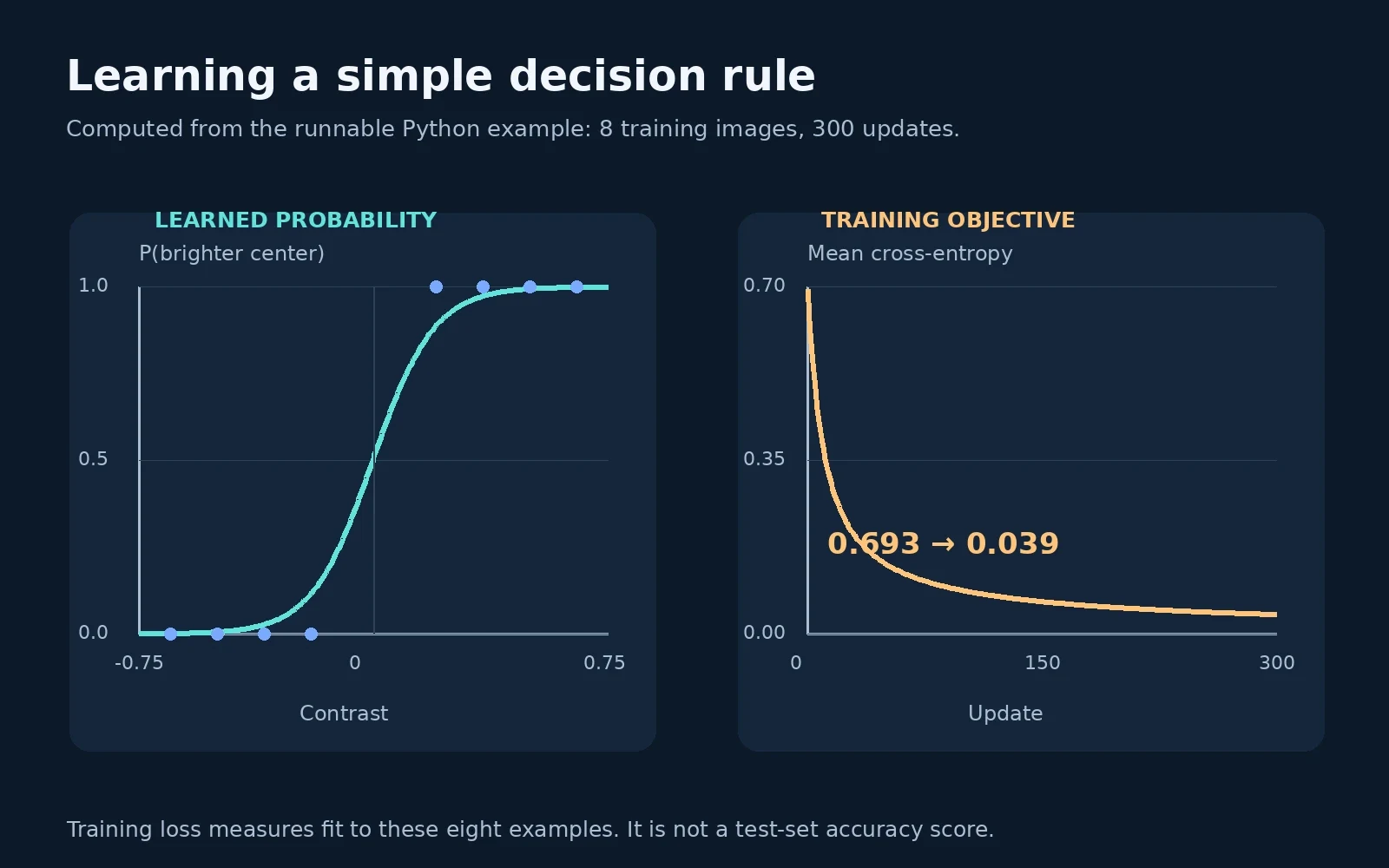
We train on eight centered images with contrasts −0.65, −0.50, −0.35, −0.20, +0.20, +0.35, +0.50, and +0.65. Positive contrasts receive label one. Binary cross-entropy penalizes probability assigned to the wrong label. We average it across all eight examples:
For a single example, differentiating this objective through the sigmoid gives . The chain rule then supplies the weight and bias gradients. Each update moves in the opposite direction to those gradients:
Our batch gradient-descent implementation starts both parameters at zero and uses a learning rate of 0.3 for 300 updates. The same eight examples contribute to every update. This is a transparent teaching choice; the number of steps and learning rate are not universal settings. A larger step can make optimization unstable, while a very small step may require many more updates.
4. Run the complete experiment
Select Run Python to execute this self-contained cell. It uses only the standard math module, creates every image in memory, and makes no network requests. You can edit the learning rate or contrast list, then run it again. The loss calculation clips probabilities before taking logarithms to avoid log(0) during experiments; the gradient uses the original sigmoid outputs.
from math import exp, log

# Original synthetic images: floats in [0, 1], not downloaded photographs.
def image(contrast, shifted=False):
    pixels = []
    for row in range(8):
        line = []
        for col in range(8):
            in_patch = (0 <= row < 4 and 0 <= col < 4) if shifted else (
                2 <= row < 6 and 2 <= col < 6
            )
            line.append(0.5 + contrast / 2 * (1 if in_patch else -1))
        pixels.append(line)
    return pixels

def feature(pixels):
    center = [pixels[r][c] for r in range(2, 6) for c in range(2, 6)]
    outer = [pixels[r][c] for r in range(8) for c in range(8)
             if not (2 <= r < 6 and 2 <= c < 6)]
    return sum(center) / 16 - sum(outer) / 48

def sigmoid(z):
    # Stable even when readers experiment with larger weights.
    if z >= 0:
        return 1 / (1 + exp(-z))
    e = exp(z)
    return e / (1 + e)

contrasts = [-0.65, -0.50, -0.35, -0.20, 0.20, 0.35, 0.50, 0.65]
xs = [feature(image(c)) / 0.5 for c in contrasts]
ys = [int(c > 0) for c in contrasts]
w = b = 0.0
losses = []
for step in range(301):
    ps = [sigmoid(w * x + b) for x in xs]
    safe = [min(1 - 1e-12, max(1e-12, p)) for p in ps]
    loss = -sum(y * log(p) + (1 - y) * log(1 - p)
                for y, p in zip(ys, safe)) / len(xs)
    losses.append(loss)
    if step == 300:
        break
    dw = sum((p - y) * x for x, y, p in zip(xs, ys, ps)) / len(xs)
    db = sum(p - y for y, p in zip(ys, ps)) / len(xs)
    w -= 0.3 * dw
    b -= 0.3 * db

print(f"w={w:.6f}; b={b:.6f}")
print(f"training loss: {losses[0]:.6f} -> {losses[-1]:.6f}")
for name, contrast, shifted in [
    ("bright center", 0.4, False), ("dark center", -0.4, False),
    ("low contrast", 0.1, False), ("shifted patch", 0.4, True),
]:
    c = feature(image(contrast, shifted))
    p = sigmoid(w * c / 0.5 + b)
    print(f"{name:14s} contrast={c:+.2f}; P(y=1)={p:.6f}")
Python · Standard library
Your changes stay in this browser tab. Reset restores the published example.
Runs locally in an isolated browser worker. Python loads on first run.
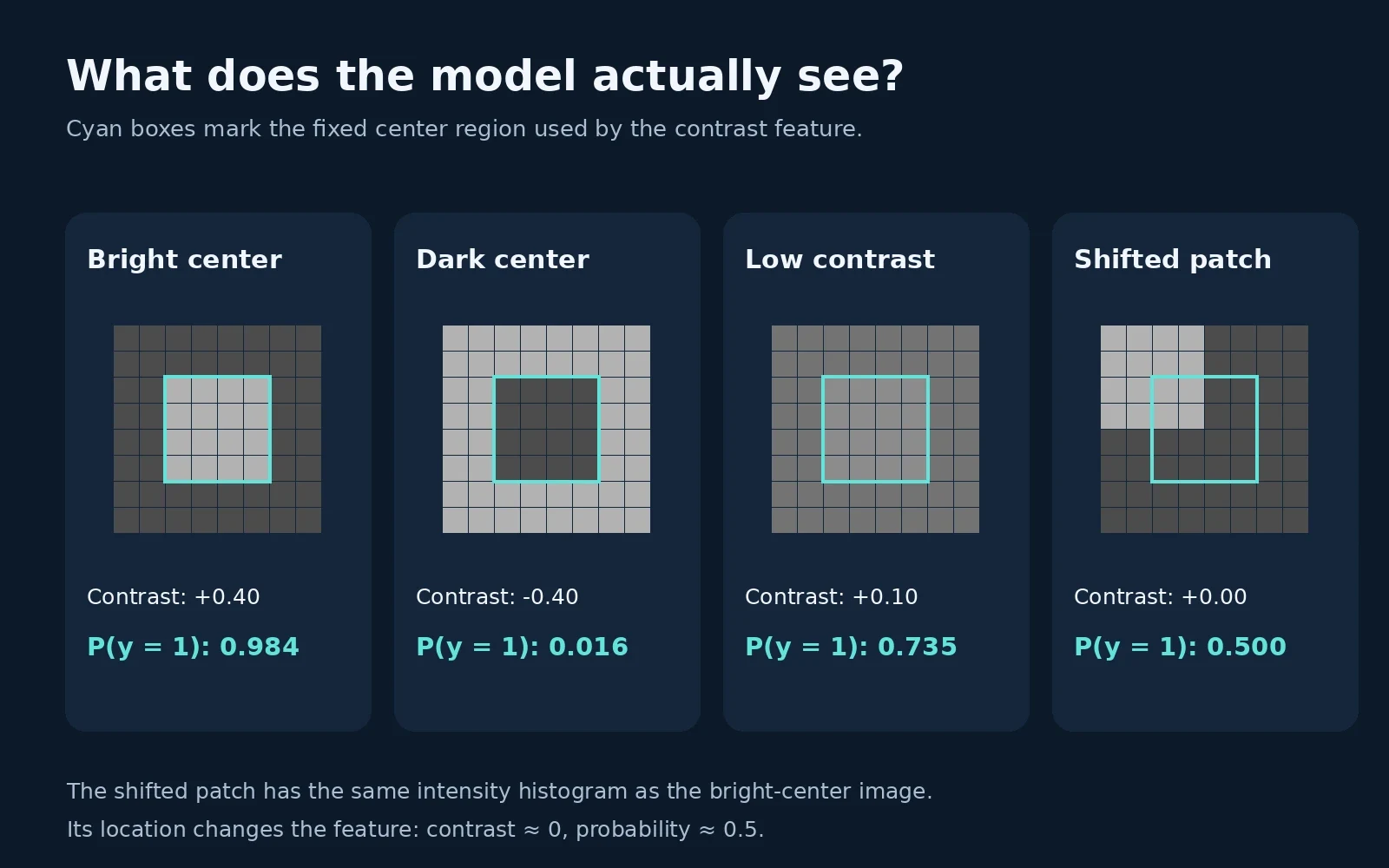
With the original cell unchanged, the fitted weight rounds to 5.111395 and the bias is effectively zero. Mean training loss falls from 0.693147 to 0.039145. The bright-center probe receives probability 0.983522; the reversed image receives 0.016478. These are model outputs on constructed probes, not an independently measured accuracy or a benchmark comparison.
5. Inspect the failure before trusting the result
The fourth image is especially useful. It contains the same 16 bright pixels and 48 dark pixels as the first, but its bright square sits in the upper-left corner. Only four bright pixels now fall inside the fixed center window. Both the center and outer regions average to 0.40, so their difference is zero and the model returns approximately 0.5.
For the stated task, this image really has no center-versus-border brightness difference. It also reveals why this representation would be inadequate for a different task, such as finding a bright object anywhere in an image. The classifier has no access to location beyond the one measurement we chose. More optimization cannot recover information discarded by the feature extractor.
The very low training loss also deserves context. These eight centered examples are perfectly separable by contrast. Without regularization, logistic-regression weights can continue growing as the objective decreases; a small loss does not imply a uniquely useful finite weight or good generalization. Stopping after 300 updates simply fixes a reproducible point on that optimization path.
6. Turn the lesson into an engineering checklist
Define the decision and its costs before choosing a feature or a model. A center-brightness detector and an object detector solve different problems.
Split independent data before fitting preprocessing. Include variations in lighting, translation, sensor noise, and background that are expected after deployment.
Compare against a simple baseline, inspect errors, and evaluate calibration and class-specific metrics on held-out data. Keep the final test set out of model selection.
Version the feature definition, preprocessing, model parameters, and evaluation dataset together. A probability without this context is difficult to interpret or reproduce.
The main value of this small experiment is traceability: a pixel change produces a measurable feature change, which produces a calculable probability change. That habit carries into larger AI systems. Start with an explicit task, make the mathematics inspectable, and let independent evaluation determine what the result can support.
References and reproducibility
For the standard sigmoid, logistic model, loss, and gradient-descent definitions, see Stanford’s CS229 supervised-learning reference. Python’s math module documentation documents the exponential and logarithm functions used by the runnable cell. All images, generated data, numerical outputs, and interpretation of the synthetic probes in this article are original to this example.